 Mare
MareManual / Mare 0.21
Linking notes
Type [[ → start typing a title → pick the note → done. The link shows as a small pill with a note icon in front. That's how you tell it from a tag or a web link. Click it to open the note. If the linked note has todos, the icon is a ring that fills as they get done, and a ticked disc when all are done. A link to a locked note is grey and has a lock.
Rename the other note and the link updates. The round button at the top right of a note lists every note that links to it.
Want to see everything at once? Ctrl+K → Map. It shows every note as a dot and every link as a line, drawn as a sea chart. Your notes are the land, with a coast around them. The rest is open water.
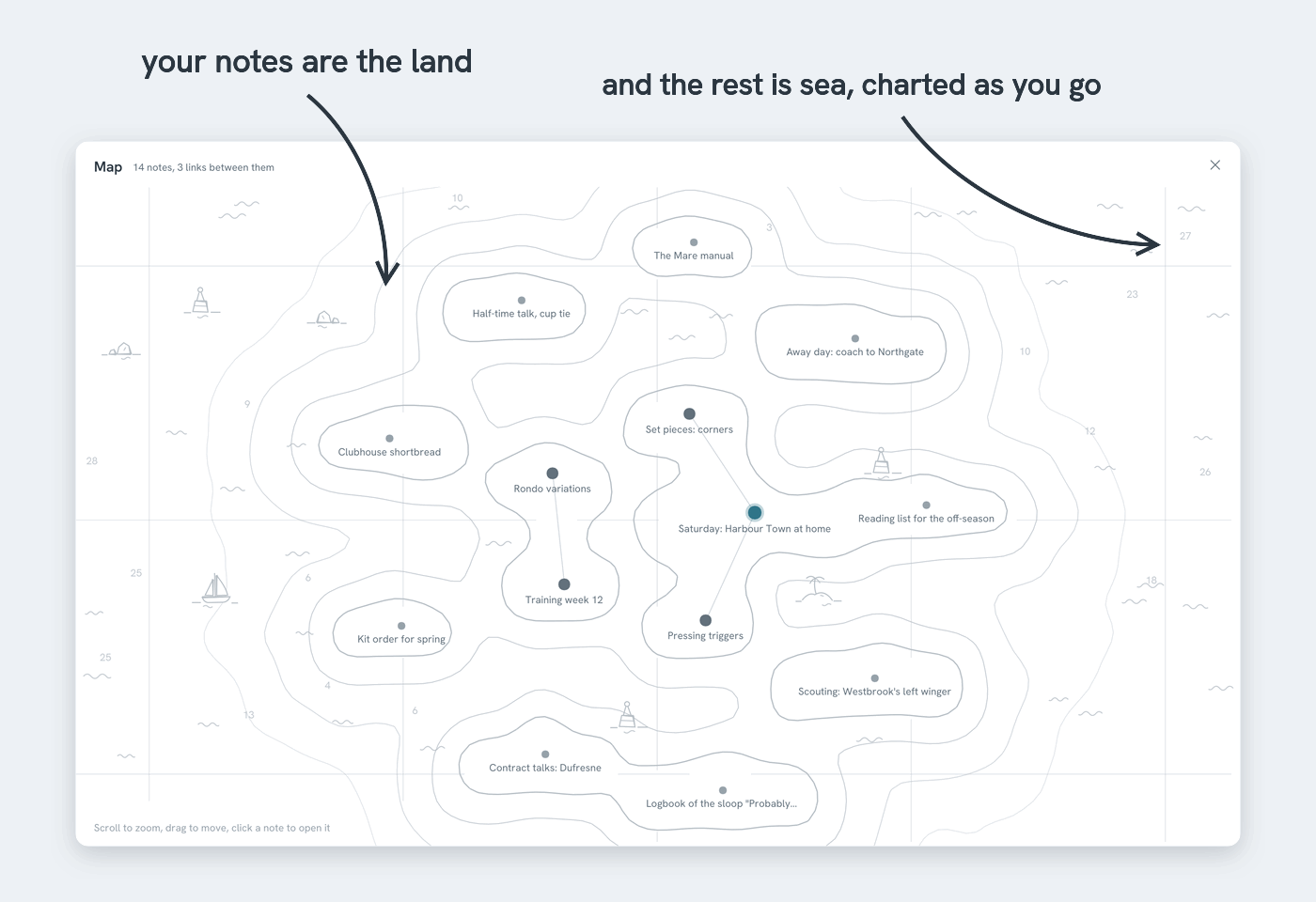
- Point at a note → it lights up together with the notes it links to, and their names show
- Click a note → it opens
- Scroll to zoom, drag to move around. The chart moves with you
- Notes with many links to them grow larger and move towards the middle. Notes with no links yet sit around the edge
- There's a button for it too: the map icon in the sidebar's search field
Follow a link and the note you came from stays beside the new one as a narrow spine, with its title running down it. Follow another link and you get a second spine. Click a spine to go back. Picking a note from the list or from search clears the spines.